
Name Badge Artwork Guidelines
Follow these design requirements to ensure your badges are readable, print safe and production ready.
Front of the Badge Design Rules
Guidance

ESTABLISH CLEAR NAME HIERARCHY
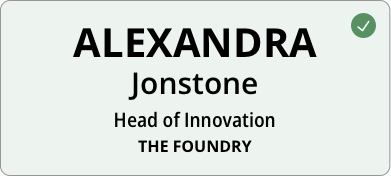


DESIGN FOR DISTANCE AND MOVEMENT
MINIMUM FONT SIZE
First name: 36-38pt Bold
Last name: 20pt Medium
Job title/org: 14pt Regular
USE SANS-SERIF FONTS

DESIGN FOR HANDMADE PAPER
AVOID FINE DETAILS

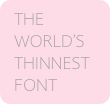
DARK PRINTS DARKER


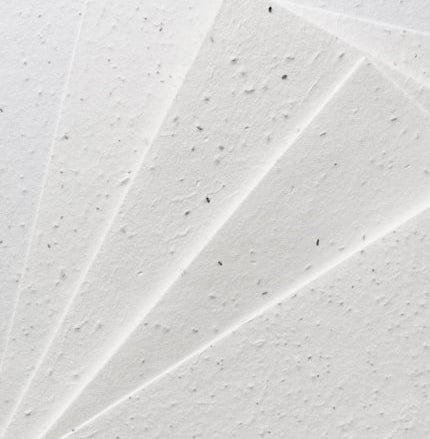
EMBRACE PAPER TEXTURE

THE CRAMMING RULE
A7 badges work best with minimal content. As elements are added, legibility drops and the badge becomes less functional. Design your custom name badge so key information is readable from 1–2 metres at conferences and networking events.
Recommended content by badge size
A7: Name, title, organisation, one logo
A6: Name, title, up to three logos, QR code, short schedule
Back of Name Badge Artwork Requirements
*Required

GUIDELINES
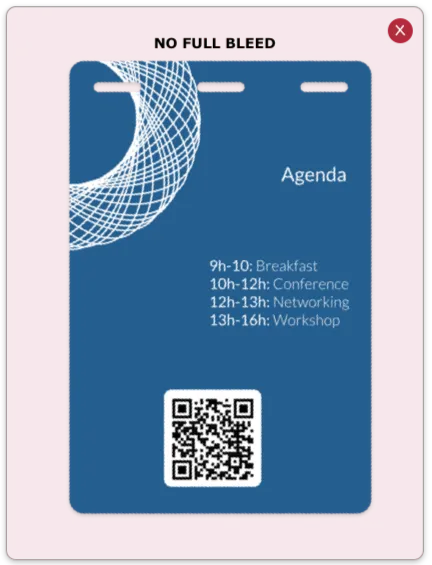
- No full colour backgrounds
- Use for sponsor logos or QR codes
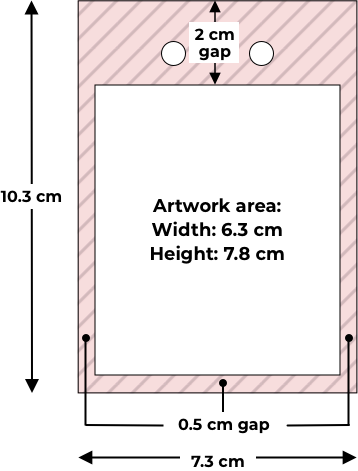
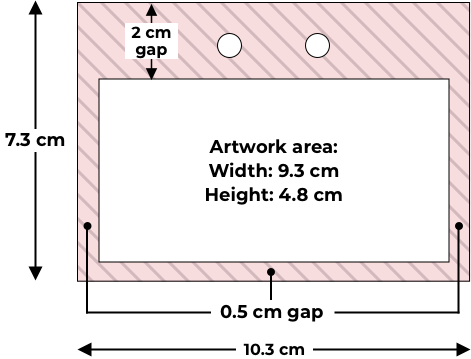
- Mandatory margins of 2 cm from top and 0.5 cm sides and bottom
Note: Handmade paper can shift. Perfect centring on the back of badge is not guaranteed


HIGH RESOLUTION IMAGES ONLY
Logos, images, icons must be a minimum of 600 dpi to print clearly.
Exact Badge Dimensions and Print Safe Areas
*Required

Templates Make Life Easier
Use our ready-to-go templates with safe zones, margins and dimensions already set up.
CANVA
MS WORD
POWERPOINT
FRONT OF BADGE GUIDELINES
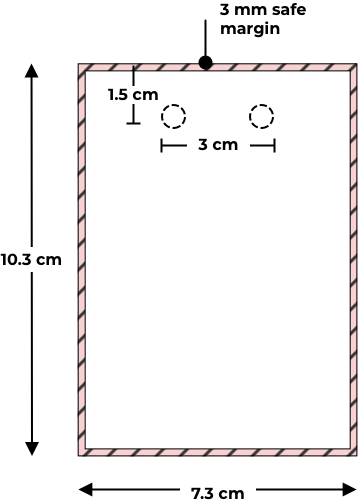
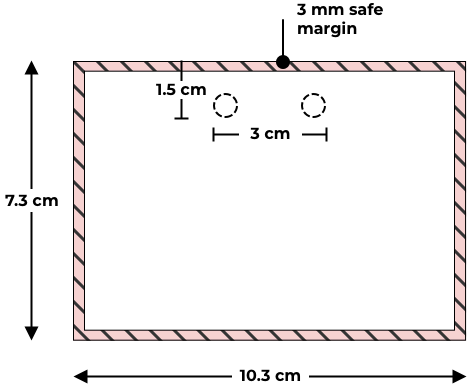
Trim Size:
Mandatory Margins:
Lanyard Position:
7.3 cm x 10.3 cm
3 mm mandatory white border
2 Holes, 1.5cm from top, 3cm wide
VERTICAL ORIENTATION
HORIZONTAL ORIENTATION
BACK OF BADGE GUIDELINES
Mandatory Margins:
Top = 2 cm; Sides/Bottom = 0.5 cm
VERTICAL ORIENTATION
HORIZONTAL ORIENTATION
Production Templates Make Life Easier
Use our ready-to-go templates with safe zones, margins and dimensions already set up.
CANVA
MS WORD
POWERPOINT
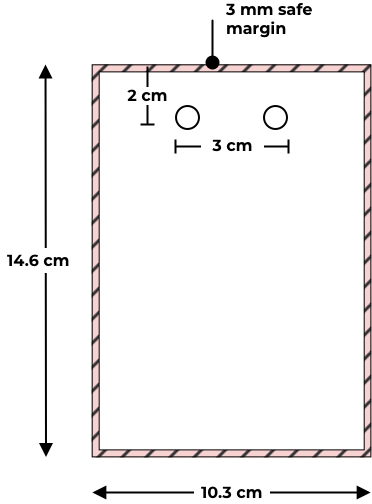
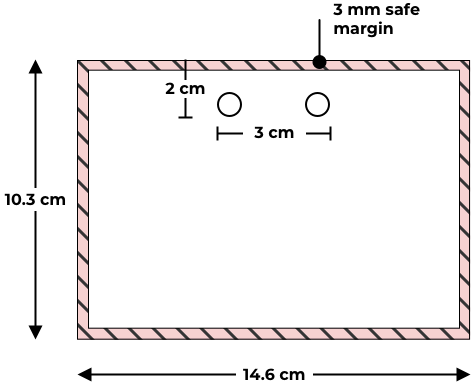
FRONT OF BADGE GUIDELINES
Trim Size:
Mandatory Margins:
Lanyard Position:
10.3 cm × 14.6 cm
3 mm mandatory white border
2 Holes, 2 cm from top, 3 cm wide
VERTICAL ORIENTATION
HORIZONTAL ORIENTATION
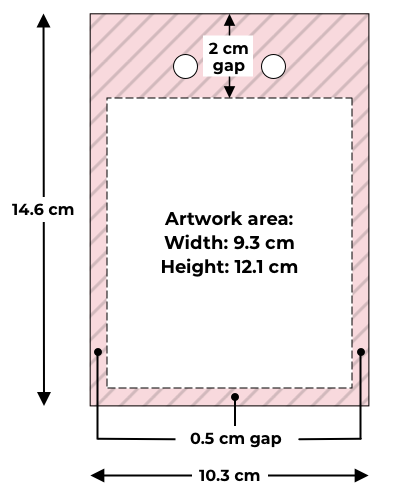
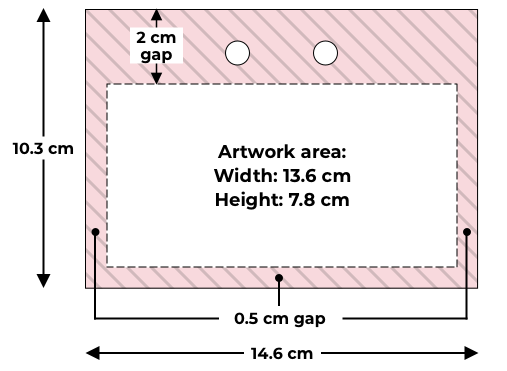
BACK OF BADGE GUIDELINES
Mandatory Margins:
Top = 2 cm; Sides/Bottom = 0.5 cm
VERTICAL ORIENTATION
HORIZONTAL ORIENTATION

How to Format Your Guest List
CSV ONLY — NO EXCEL
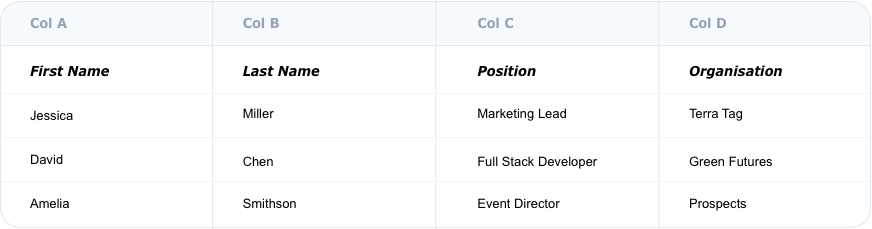
Export your guest list as a Comma Delimited (.csv) file. Do not send us .xlsx or .numbers files — they will be rejected.
*Required
SPREADSHEET STRUCTURE

SINGLE SOURCE OF TRUTH
Your guest list is the ‘source of truth’. What you put in it is what gets printed. Double check spelling and capitalisation before submitting.

Impact QR Code Placement
WHY WE INCLUDE IT
Terra Tag badges are different. Guests ask: “Is this plantable. How? Can I recycle it? “. Without guidance, they might throw it away. The QR code gives guests answers at the right moment. And without it, your sustainability choice goes unnoticed and the opportunity to reflect your values is lost.
Guidance

Make sure guests know what to do with their badge
Put the reycling and planting QR Code on the back of your badge artwork.
Download QR CodeQR CODE COPY FOR SEED PAPER
I’m seed paper handmade from office waste — better for events, better for the planet. Plant me!
QR CODE COPY FOR RECYCLED PAPER
I’m handmade from office waste — better for the planet. Scan for recycling magic.
Recognition First Badge Design System
Build better conference badges with the complete design frameworkTM
Badge content is just one part of good badge design. The Recognition First Badge Design SystemTM brings together hierarchy, typography, badge sizes, layouts, accessibility, print production, and workflow into one practical framework for designing conference name badges that work.
Explore the Design SystemArtwork Submission Checklist for Custom Name Badges
*Required
Your Guest List
Your Badge Design
Your Format
CANVA
PDF, JPG or PNG
INDESIGN
Have a Question Before You Submit?
If you’re unsure about file formats, safe areas or guest list setup, send it through. A quick clarification now prevents production delays later.